
Nov 14, 2026
How to Configure an L-Shaped Manager Desk for Multi-Monitor Office Workstations
To configure an L-Shaped Manager Desk for a multi-monitor workstation, start with the monitor count and the room size. Place the primary screen directly in front of the user, put secondary screens on the return, and keep documents and short meetings on the open side. Then check desk depth, chair clearance, cable routes, storage, and material quality before you order. I wrote this guide for office planners, procurement teams, distributors, and project managers who want a clear process. It covers dimensions, layout, materials, supplier checks, and the PENGPAI desk specifications, so you can move from planning to a confident inquiry.
Start With the Workstation: Requirements and Dimensions
Define the Full Workstation System
The first thing I do is make a short list of the important things the person wants. A desk is only one part of a place to work. There are five screens: two regular monitors, three displays, and one screen that is very wide. Make sure the VESA arms can attach to the desk and that there is a laptop dock. Note down how much each screen costs. Next, split the room into places to work, read and write, hold meetings, and store things. There are zones that are used for different things by different people. Make this list first. It will help you think about how the desk you want to buy will work for you, not just how it looks in a picture.
Match Desk Dimensions to Monitor Count
A lot of business L-Shaped Manager Desks are between 60 and 72 inches long, 48 to 72 inches wide, 24 to 36 inches tall, and have a 48 to 72-inch long return. You shouldn't follow them as strict rules, but only to help you plan. There might be room for two computers in a small room. This is because you need more width and corner room for three monitors, an ultrawide screen, or monitor arms. Computers should usually be about an arm's length away from your eyes. A narrow desk, on the other hand, makes people sit too close to each other. Always call the maker before placing your order to make sure you know the exact size, thickness, and direction of the return.
Measure the Room Before You Order
Before you buy a desk, measure the space you have. You should write down how long the walls are, how the doors open and close, the paths, and the spots where people will sit. Then, make sure the chair can move around without running into a closet or wall. Don't forget to clean up any paths that could be dangerous. Closet and drawer doors should be able to open all the way. It's helpful to have a bigger sketch. Before you make it, send it to the source and ask for a 2D plan. First, make sure that the desk can still be used before putting it in an office.
Plan the Layout, Storage, and Cable Routes
Place the Primary and Secondary Monitors
This is the main screen. Put it right in front of the person who is going to use it. The screen's top edge should be at or just below eye level, and it should be close to eye level. When you use the computer and mouse, keep your arms and hands straight. ANSI/HFES 100 and ISO 9241-5 both address workstation layout and posture, so they can both be used to start writing a project outline. Most of the time, second screens are in the back and are used for email, monitors, ERP systems, or CAD references. The clamps need to be strong enough to hold the desk and its base up. Monitor arms can make more room on your desk. If you put the screens you use most in the middle, no one will look at them.
Use the Return for Work Zones
Every job needs a different set-up. There are two screens that a manager can put in the main area. The back screen can be used for tools and papers. That person, like an engineer or operations manager, could add a third screen on the back with an arm to show plans. The people in charge need to make sure there is a clear space for guests to sit and read or talk for a short time. A small office can use storage that can go up and down and chairs that aren't too big. A room that is already big can get a desk, filing cabinet, guest chairs, or a small meeting table added to it. People should never have to squeeze past furniture to get around.
Plan Storage, Cable Management, and Power
L-Shaped Manager Desks with more than one monitor require organized storage that is useful and doesn't take up too much space. It has box drawers for things you need and file drawers for legal or letter-sized papers. The mobile pedestals make it easy to move the desk. A hutch might give you more storage room, but it can also block light and make the wall less movable. It's also important to keep the cables in order. Check for power or data modules, plugs, and trays that fit under your desk. Check to see if the hardware can work with and connect to all the other hardware. Views, arms, computers, printers, and files should all be able to fit on the table. Ask the seller about load rates, how to place the goods, and how to route the wires so that there are no gaps when they get there.
Compare Configurations, Materials, and Buyer Needs
L-Shaped, Straight, and U-Shaped Desks
There are three shapes of desks shown next to each other. The straight desk is best for small rooms with one or two screens because it has the least amount of depth and surface area. With an L-Shaped Manager Desk, you can work on multiple screens, write, and hold short meetings. This is because it needs a corner and air to flow through it. Since it takes up the most room, the U-shaped desk works best in large rooms with lots of desks. There are times when a straight desk doesn't give you more space to work or a better way to separate meetings, digital work, and paper work. A desk in the shape of an L does. A U-shaped setup takes up more floor space than this one. Most manager offices work best in an L-shape because it gives them just the right amount of room.
Material Choices for Commercial Use
It's easy to find wooden desks in a lot of different finishes. It's stronger, and the modules can be used in more ways if they have a metal frame or a mix of different shapes. Melamine and plywood are strong and easy to clean on the outside. On the other hand, pH-neutral cleaners and shade are what wood veneer needs to stay fresh. Also, the edges are important since chairs and carts will be running into them a lot. Find out what papers back up the formaldehyde rules in TSCA Title VI from the EPA and the CARB rules for US projects. It's not safe to think that grades E0 and E1 are the same. You should instead ask for proof that the tests were done.
Match the Desk to the Buyer
What you need, how you work, and how much space you have will all affect which desk is best for you. When designing a small office, it's best to keep things simple and neat. Storage should also be able to be moved around. Most of the time, executive offices need more space, nicer finishes, wiring that is hidden, storage that is well-organized, and a place for guests to sit. A lot of the time, tech teams need bigger desks, screens that can hold a lot of weight, and room to draw. Many times, the best deals are on standard business orders that need strong lamination, standard parts, good packaging, and easy assembly. Also, these people need to make sure that the information on both the sample order and the big order is the same. Before you decide, think about how it looks, how long it will last, and how you can change it further down the road.
Avoid Costly Mistakes and Write a Clear Specification
Common Configuration Mistakes
A lot of people make the mistake of measuring their desk first instead of the whole room. When you measure the room, make sure to include enough room for the chair to move, as well as doorways, closets, and escape routes. Other things that aren't being checked are the thickness of the desk, the length of the cords, where the plugs and outlets are, and so on. Like the room for the clamp to hold the monitor arms. It's hard to find files and hold meetings when the return is too full. Also, too many things are kept in the wrong places. Also, some people only look at the price and how it looks, not the tools, materials, load capacity, warranty, extra parts, or how to set it up. It costs less to write down these problems than to fix them after the program is over.
Build a Specification Sheet
When the needs are clear for an L-Shaped Manager Desk, quotes will be more accurate, and it will be simple to find the best seller. You should write down the overall size, the way of the return, the number of drawers you need, the types of drawers you need, the filing needs, the hutch choices, the features of the cables, the finishes, the colors, and whether or not the monitor arm will work. Make a list of the materials you need, like melamine, veneer, powder-coated metal, or plywood. Explain how you think it will handle scratches, water, wear, and color changes. Then, ask for size drawings, samples, photos, load data, instructions on how to put it together, information on how it will be packed, certifications, warranty terms, and information on spare parts. If the service provider can't tell you how the project will go, you should.
Compare Suppliers Beyond Unit Price
The price per unit doesn't tell the whole story. How well do OEM and ODM handle quality? How much can they make? How well do they communicate with each other? How steady are their deliveries? PENGPAI is a company that was founded in 2008 in Shunde, Foshan. I work for a company that makes things. I do business with other nations as well. They make examples, technical checks, and both 2D and 3D models at the office. The project manager is in charge of communication, the progress of the work, and getting it done. We make a design based on what the customer tells us they want. Then we make tests, then the whole thing, make sure it's good, and ship it all over the world. It's also important that the buildings are safe to ship and put back together again, so that the prices of both are low.
PENGPAI L-Shaped Manager Desk: Specifications and Final Checks
Models, Sizes, and Style
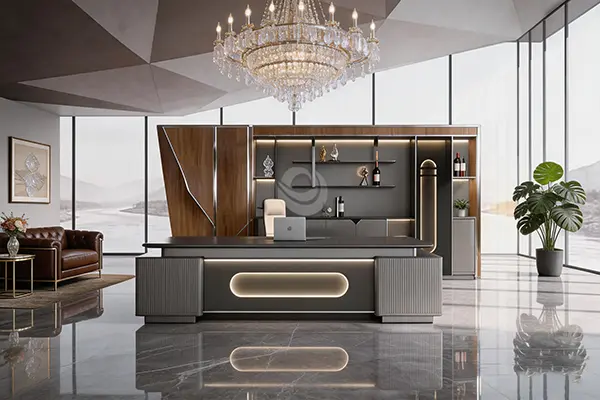
Our L-Shaped Manager Desk has the following measurements and build. The cabinets are ribbed and light gray. The wood grain is deep brown, and there is an oval light strip in the middle. It seems classy and up-to-date. It's stable because it has a low center of gravity, and the flat top makes it easy to clean. 25 Iron Gray and Deep Coffee Wood Shadow are the colors. The models are the 26BZ-B32L (3200 × 1860 × 760, or 126 × 73 × 30 inches), the 26BZ-B28L (2800 × 1860 × 760, or 110 × 73 × 30 inches), the 26BZ-B26L (2600 × 1760 × 760, or 102 × 69 × 30 inches), and the 26BZ-B24L (2400 × 1760 × 760, or 94 × 69 × 30 inches). This range of sizes works well for CEO rooms and bigger manager offices. There are things in stock at the warehouse in Foshan, China.
Materials, Certification, and Quality
The QA team looks at the little things. A high-density board base of grade E0 is put on top of a PET film finish for the desk. The sides are made of ABS PUR, and the paper is Schatt three-layer melamine. The hinges are good. Particle board of grade E0 is used to make the other parts. From SGS CEC, we know that the desk was made in Foshan, China. It's said to last five years. The lines of work in our factory came from Germany and Italy. Before we send the goods out, we check the quality of the materials, watch how they are made, and look over them one last time. For your project, what kind of test papers and copies of certificates do you need? Tell our team.
Verify the Final Setup
The loop is broken by verification. Before you install, you should make sure that the power outlets, data links, monitor placement, and storage access all meet the requirements. Here's a desk with a dim light strip. Please ask us right away where the power comes from. Once the monitor is set up, it's important to check its height, viewing distance, room, glare, and reach lengths. Over time, you should keep an eye on how often the meetings need to be cleaned and how easy it is to get to the storage. It's simple to use, has enough space, looks good, and you can add or take away tools at any time.
Conclusion
Planning ahead in a methodical fashion is the best way to set up an L-Shaped Manager Desk for multiple monitors. First, set up the screens and places to work. Then, make sure there are enough chairs and paths and that the room is big enough for the number of computers. Put the main screen in front of the person who is going to use it. Another screen or paper can fit on the back. Check out the storage, the load capacity, and how the wires are set up. An L-shaped desk is better for manager offices than a straight or U-shaped desk because it makes better use of space on the floor and on the desk. Make sure the edges are sharp, choose the right things, and keep the safety papers close by. One last look at the installation and a written list of requirements helps keep the desk clean and cozy.
FAQ
What size L-shaped desk fits two monitors?
A question that comes up a lot is what size L-Shaped Manager Desk can fit two monitors. You can start with a main length of 60 to 72 inches, a return of 48 to 60 inches, and a width of 24 to 30 inches. These are our PENGPAI models. They are longer, between 94 and 126 inches, and work well in executive rooms with more floor space.
Is an L-shaped desk better than a straight desk?
It usually separates screens, papers, and conversations, which is helpful for people who use more than one computer. You can still use a straight desk, but in small rooms it's not as useful.
What should I ask a supplier before ordering?
Before I buy something, what should I ask the person? How the lines will be routed, the materials used, the load rates, the guarantee, the wait time, and the paperwork that shows they follow the rules are all things you should ask about. You should also ask for samples and models to make sure the final product meets the standards.
Configure Your L-Shaped Manager Desk Project with PENGPAI
Are you ready to set up your L-Shaped Manager Desk? PENGPAI needs to know how big your room is, how many TVs you need, how big your order is, and where you want it sent. Email them at kiki@pengpaifurniture.com. We produce L-shaped manager desks in Foshan, China. A project manager who only cares about your desk, models that are already in stock, and E0-grade boards are all here. Visit pengpai-furniture.com to review our products, then request samples or a formal quotation.
References
1. Human Factors and Ergonomics Society, ANSI/HFES 100 Human Factors Engineering of Computer Workstations, 2007
2. International Organization for Standardization, ISO 9241-5 Ergonomic Requirements for Office Work with Visual Display Terminals: Workstation Layout and Postural Requirements, 1998
3. BIFMA International, ANSI/BIFMA X5.5 Desk/Table Products – Tests, 2014
4. U.S. Environmental Protection Agency, Formaldehyde Emission Standards for Composite Wood Products (TSCA Title VI), 2016
5. California Air Resources Board, Airborne Toxic Control Measure to Reduce Formaldehyde Emissions from Composite Wood Products, 2007
6. Pheasant, S. and Haslegrave, C., Bodyspace: Anthropometry, Ergonomics and the Design of Work, 2006
Online Message